

Are you an X-bar fan?
Oldsap's blog features x-bar XMC's to enhance and automate your smartphones.
His blogsite is acknowledged by the author of x-bar himself.. check this out!
Oldsap's blog features x-bar XMC's to enhance and automate your smartphones.
His blogsite is acknowledged by the author of x-bar himself.. check this out!
 AIM for PocketPC allows you to stay in touch with your AOL buddies from your PocketPC. You can send instant messages, communicate with multiple people simultaneously, access your personal AIM buddy list and more. In addition, the program can retrieve stock quotes (delayed) and current news headlines which link to PocketPC compatible online stories. The install and setup is very simple, just enter your AIM login and password and it will automatically retrieve your BuddyList and you are ready to chat (internet connection required).
Link
 Based on the tetris concept, this game can keep you entertained for hours!
Keep an eye on the different S-Tris blocks, and try to keep the field as empty as possible. Get many lines at once to retrieve a higher score.
Download SP
Download PPC
 MemTrack is a solution to the age old problem of tracking memory usage and discovering memory leaks in the software that you develop. This area becomes an important consideration when dealing with limited resources of a handheld device. MemTrack allows you to "capture" the current amount of free memory available to the system, and it allows the difference between two readings to be calculated.
 By using MemTrack, it is now possible to make sure that functions and processes that you develop return the resources back to the system.
LinkDownload
Txt Msg provides acronyms and abbreviations used when text messaging via email, chat, IM, and sms.The data included from Txt Msg can be included in spell checker programs to make this processor faster in email programs. This is an ideal add on for users of small keyboard devices such as Palm OS. Fewer keystrokes is a key advantage when using Palm based messaging
Download
Download
 A quite simple calculator but so discrette that you can place it where you want on the screen while keeping your data for the eye.
Download
 The Pocket DivX Player is a FREE Open Source multifunction video and audio player for the PocketPC platform that can play DivX, OpenDivX, MPEG-4, MPEG-1 videos and MP3 audio.
Thanx to the hard work and dedication of Marc Dukette and Pedro, who now lead the development team of the Pocket DivX Player. We finally have a media player for the PPC platform that we feel has surpassed any others that are currently available today. A special thanx to Oliver Drobnik, who was the first individual to start this project and to William Kinfoussia for all his help and support to this team.
Pocket DivX Player Features List
- 10-Band Equalizer with Pre-Amp
- PlayList Support
- PlayList Editor
- Web Streaming
- Brightness Control (ARM devices only)
- File Association Support
- Hardware Button Mapping
- Shuffle Play
- 90 degree Rotate
- 2:1 zoom
- Bi-linear filtering for zoom mode
- Dithering (ARM devices only)
- Fast Forward
- Seek Bar
- Volume Control
- Custom File Open Dialog
- Custom Web View Streaming File Selection Dialog
- Keep Alive for device shutoff suspension
- Play At File Open option
- Definable Caching for performance/power utilization
Supported Audio/Video Formats
- Video: Divx, OpenDivX, Avi, MPEG-1 w/ FFMPEG mpeg video decoder
- Audio: MP3 and Layer I + II Audio w/ MAD MP3 decoder
ARM (? kB) MIPS (? kB) PocketPC 2002 (269 kB) SH3 (? kB)
 Retro-Games 4 is 10 games pack for PocketPC. It includes action games, puzzle games, shooting games and so on. You can play first level of A-ret, Magy 4 and Tuti in trial version.
Titles
Download
 FitalyLetris is a training game to help speed text input into the Pocket PC.
 The idea of FitalyLetris is to write the words that fall down. To complete a word, enter a space after it.
There are several modes — Test, Drill, Game — that focus on different demands and therefore handle speed and other parameters in different ways.
FitalyLetris is word-oriented — at places, even sentence-oriented. So you should not feel bound to enter character per character but learn to write words as patterns. This is key to improving your speed.
Fast Fitaly users already identify the next word pattern on the Fitaly keyboard as they tap the current word.
Use with all input methods...
FitalyLetris can be used as a training tool with all input methods. Fitaly, of course, but also Calligrapher, Letter Recognizer, Block Recognizer, the default Keyboard and other methods
FitalyLetris comes with a large selection of tests. These include stock test phrases as well as the 125 and 400 most frequent words of the English language.
The Train menu includes additional tests that correspond to regions of the Fitaly keyboard and to special characters: Symbols.
You can also supply your own tests for the menu positions initially marked as Text 1 through Text 5. For example, on the left, Text 1 has been redefined as "My Own Test."
Download This is a very simple GAPI application (runs on color ARM only) that displays animated kaleidoscope-like images. Not very usefull, but is entertaining :-) (wait for 1-2 minutes for more complex patterns) and source is very simple so might be useful if you are learning PocketPC programming (but beware - comments are in Polish :-). Windows (DirectX) version is also included.
Download
 With the colour code, ResistorCalculator is able to calculate the resistance and vice versa. It is a freeware application.
ResistorCalculator 1.1 is a full new version of ResistorCalculator 1.0 with a improoved user interface. It is now very easy to select the colors of a band.
Link
 Similar to widespread application Paint. In the first version the following tools are implemented: Select, Erase, Eyedrop, Magnify, Pen, Brush, Line, Rect, RoundRect, Oval. Also it is possible to undo last action and load and save files in bmp format.
Download
 Very intuitive interface - Lots of colours and range of brush types - Foreground and background colour control - Transparency/Alpha control to brushes for creating effects like water or depth. - Multiple canvas - Ideal for the long train journeys or to draw out a quick idea in a meeting - Vector graphics for smooth no anti-aliasing problems on screen. Installer will install for ARM, MIPS, X86EM and SH3 devices.
Download
 A useful utility to keep for those moments when you wish you had a small ruler in your pocket. Once installed Ruler only occupies around 8K of your machines precious memory.
Download
 View all your folders and files with visual feedback as to which folders contain files of a specific type. Now you can see which folders have the files you are looking for. You can also select to just view folders (default) making it easy to see where your favorite type of files are located. Register for free and participate in our monthly software give away.
Download
 Download your FREE HandStory Basic, acclaimed as "the Swiss Army Knife of media viewers" for the Palm OS, is now available for the Pocket PC platform. HandStory is the simplest and easiest solution to browse Web Clips, read Text and eBooks, and view Images. This 4-in-1 application can easily convert images and texts from the Internet right into your Pocket PC handheld with a click of a button. HandStory is a must-have software for your Pocket PC.
HandStory Suite for Palm OS received
5 Cows from Tucows.com !!! 5 Stars from Muchy.com !!!
5 Stars from Handheld Computing Magazine !!!
HandStory Converter (Included in Basic)
Use HandStory Converter on Windows for easy and convenient conversion of texts and images from your PC or the Internet.
* Enjoy 256 colors or 65,536 High-Color image conversion.
* Convert selected texts or images directly from Internet Explorer to your PocketPC.
* Copy and paste information from any file on your hard drive.
* Take advantage of the automatic image resizing function of HandStory Converter to optimize the image view.
* Convert only as much of the image as you want by using the Crop feature.
* Download your favorite Clips from the HandStory Clip Service.
HandStory Browser (Included in Basic)
Use this multi-function information browser to browse Web Clips, read text and eBooks, and view images.
* Save your PDA's memory by using a 4-in-1 application.
* View all your Clips, text, eBooks, and images in one place. No more switching back and forth between programs.
* Use the Popup Menu on the list screen to easily manage files.
* View images in Full Screen.
* Add and edit Bookmarks in text and eBooks.
* Easily send files to others via E-mail or Beaming
Download
 SIManager 1.1 is a contact organizer utility for Pocket PC 2002 devices that enables you to manage your contacts stored on a SIM-card, GSM Phone or on a Pocket PC 2002 device.
You are able to create new contacts, modify or deleted existing contacts and to transfer all or single contacts to and from the PDA, GSM Phone and SIM-card.
SIManager supports most GSM devices with IR, serial cable or Bluetooth connection.
Download
 Since the Pocket PC uses Unicode characters and Fonts, you automatically have hundreds of special characters available for your use even though they are not shown on your input keyboard. Character Map allows you to easily find and use them in any Pocket PC application. Simply choose and copy them to the clipboard, then paste them into your application. Though not required, if you are using NanoPad (the SIMPLY BETTER input method) it also shows you the Alt key character to enter directly in NanoPad or to assign to a Function Key Macro)
Download
 This is a remake of the classic Atari 2600 game. Get four in a row on the 4x4x4 game board to defeat your opponent in this single/multi-player game.
Summary:
3-D Tic-Tac-Toe is for people who:
Download
 This program changes the Start logo.
 When you tap the new logo a default Start menu is displayed. But when you tap-and-hold the new logo a new small menu is displayed. It gives you Power Off and Soft-Reset options. And it shows your name (Owner names - you written previously on the Settings).
Download
 Ever had the need to edit a shortcut file on PocketPC?? Then you must have experienced the same
frustration as many others!
Well, It's no more the case! Get Smart.lnk! Get smarter..
Smart.lnk allows you to edit the shortcuts right on the device! So no more struggling copying the files to desktop, edit and save back to device!
And that's not all! You can create new ones as well. For instance, Adding a new shortcut to startmenu is smoother than you ever thought!
Very handy for java developers working on PocketPC!
Save your precious time! Happy lnk-ing!
Download
 lektor is a tiny decrypting program for passwords. It allows you to reveal an old password stored on your computer in a bookmark or a configuration file. This utility can only show the passwords stored in a local file. It can not used to attack external system, nor in batch mode. Currently support cisco, ncftp & alcatel passwords.
Download
 PocketPC/PocketPC 2002
 LEDhead for PocketPC
Current Version: 1.0
NOTE: On Baseball is not possible to swing by tapping on the on-screen "HIT" button. You must use a hardware button. This is a known issue - I am working on a solution to this.
Make sure you download the correct build for your device, and please see the included file README.TXT for updated installation instructions!!
 ARM Compaq iPaq PocketPC, AND ALL POCKET PC 2002 DEVICES MIPS Casio Cassiopia PocketPC (not for PocketPC 2002 devices) SH3 HP Jordana PocketPC (not for PocketPC 2002 devices)
 NOTE: LEDhead requires that you have Microsoft's GAPI Library installed. If you run LEDhead and get the message "Cannot find LEDhead (or one of its components).", you do not have GAPI installed. It seems some people are having trouble due to not having this component installed. If your device does not already have it installed (most games will install it for you), you can download it from here. You will need to unzip the proper gx.dll and gx.lib files for your device and copy them to your device's /Windows folder.
Screenshots
Download
 DKDiary is an easy to use diary software for PocketPC developed with Visual C# based on the .Net Compact Framework. The data is saved in XML format which can later be shared with other applications in your PocketPC or desktop PC
Download
 Game rules:
The target of the game is to make all squares green. When you hit the square it changes his colour and the colour of it's four neighbours from left, top, right and bottom.
Tips:
* There are 8 difficulty levels.
* All puzzles are unique and generated randomly.
* Try to make all the squares green with the minimum number of hits.
Link
Download
 Balance Keeper is an educational tool that helps children practice addition, subtraction, logical thinking, and basic algebra. The purpose of the game is to balance a scale with various weights. Complex problems consist of unknown mystery weights. Through deductive reasoning and trial and error techniques, a child can determine these weights. Balance Keeper implements fifteen skill levels that automatically adjust in difficulty. Mastering all the levels will definitely jumpstart a child's grasp of basic algebra.
Link
 Children in years past have always practiced their basic mathematics by using flash cards. This learning methodology is highly effective in sharpening children's computational capacity but lacks dynamic feedback. Flash Math duplicates the positive aspect of flash cards and provides dynamic feedback. Also, Flash Math scales problems according to children's proficiency so that they are not frustrated by difficult problems or unchallenged by less intricate equations. The problems presented are for children in grades first through third in a standard US school curriculum.
Link
 English/Metric conversions
Altitude, Areas, Distance, Depth,
Fuel, Length,Liquid, Mass, Torque,
Temperature, Volumes
Download
 Access the Memory Settings, Running Programs and Remove Programs control panel easily through this today plugin. Absolutely Free !!!
Download
 Fast Swapper for Pocket PC was created in the tradition of such well-known games as Lines, Tetris and other "tile" type games. Straightforward rules but fascinating logic make for a great game accessible to all.
The principle of Fast Swapper may be easy to grasp, but donТt let overconfidence be your downfall. You have to be super-attentive to win as many points as you can, by swapping three or more adjacent items vertically and horizontally. YouТll see various kinds of chips and hear a great soundtrack.
Download
 Pencil Box is an extremely light and simple drawing tool for your Pocket PC. It does not have tons of features, however, it allows to create really nice pictures, quick and easy! Pencil Box consist of only necessary things: eight pencils, eraser and canvas to draw on. Try it out - maybe it will become you favorite!
Download
 Freeware clone of Windows' Minesweeper. The objective of the game is to locate all the mines as quickly as possible without uncovering any of them. If you uncover a mine you lose the game.
All the features of the PC version on your mobile device.
All Mobile Mines is fully compatible with Windows Mobile-based 2003 SE Pocket PCs, play in landscape or portrait mode.
Download
 ScreenOff is a tiny but handy utility which does nothing but turns off the PPC's display.
Use this tool to preserve battery power, yet still keeping it alive to let it continue processing. Especially useful when playing MP3 or streaming the net on your PPC.
Best to assign it to a hard key (by using Start->Settings->Buttons) and you can turn off the display anytime you want with a simply press on the assigned key.
ScreenOff should work on any Pocket PC with an ARM (including XScale) CPU. It only takes about 5kb memory space.
Download

PowerOff is a tiny but handy utility which does nothing but turns OFF your PPC. Just like you press on the Power Button. You can put it on your Today Screen so you don't need to press on the Power Button to turn off your PPC. Just simply press on the PowerOff icon (wherever you put it).
PowerOff should work on any Pocket PC with an ARM (including XScale) CPU. It only takes about 5kb memory space.
Installation Guide:
Just copy the proper cab file to your PPC and install it with any file explorer. A shortcut (PowerOff.lnk) will be created automatically under:
Download
 SoftReset is a tiny but handy utility which does nothing but does a soft reset for your PPC. Just like you press on the soft reset hole (or button). You can put it on your Today Screen so you don't need to press on the soft reset hole/button each time you do a soft reset. Just simply press on the SoftReset icon (wherever you put it).
SoftReset will ask you to confirm the soft reset. You can choose Yes (to do the soft reset) or No (just cancel the action).
SoftReset should work on any Pocket PC with an ARM (including XScale) or SH3 CPU. It only takes about 9kb memory space.
Download
 HardReset is a tiny but handy utility which does nothing but does a hard reset for your PPC. Just like you do a hard reset by pressing those combination keys (quite difficult sometimes). You can put it on your Today Screen so you don't need to press on those combination keys each time you do a hard reset. Just simply press on the HardReset icon (wherever you put it).
HardReset will ask you to confirm the hard reset. You can choose Yes (to do the hard reset) or No (just cancel the action).
Note: HardReset will erase all the data and files on your PPC. So please be cautious when use this tool.
HardReset should work on any Pocket PC with an ARM (including XScale) CPU. It only takes about 5kb memory space.
Download
 BatteryTime is a small Today Screen plugin which monitors battery's uptime since last charge and displays the current battery charge percentage on PPC's Today Screen.
There is no option or whatsoever. Just install and your battery will be monitored. When the PPC is connected to a charger, the uptime will be reset to zero. The uptime will start count whenever the charger is disconnected.
If you also want to monitor your PPC's memory status, you can try BatteryTimePlus, another free plugin which is not only monitor battery usage, but also display current memory status.
Tap or tap&hold on BatteryTime (on Today Screen) will display a popup menu which allows a user to choose from:
* Close Menu: Closes the popup menu. Or just tap anywhere else other than the popup menu will close it too.
* Reset uptime. Sets the current uptime value to zero
* Today Plugins: This will open the Today Plugin setting control panel
* Alarm Clock: Opens the Clock-Alarm setting control panel
* Backlight Brightness: Opens the backlight brightness setting panel (probably only works on some iPaq PPCs)
* Hardware Buttons: Opens the Program Buttons setting panel
* Infrared Connection: Opens Bean setting panel
* Power Control: Opens the Power setting panel (not work on some PPCs)
* Running Programs: Show current running programs
Because each Pocket PC has its own hardware control, Backlight Brighness and Power Control might not work on some PPCs. Based on my own testing, Backlight Brighness setting works on both iPaq 2210 and 4150. Power Control works on most PPCs but doesn't work on iPaq 2210 (don't know why).
It'll be very appreciated if you could try these menu items on your PPC and send me the feedback about these two items. Many thanks.
BatteryTime should work on all PPCs with ARM (including XScale) CPUs, Pocket PC OS 2002 and up. It only takes 11KB memory.
Download
 How to use it? Simply tab on your PDA screen. The background color of your PDA screen will be changed. Let's see colored points which distinct in color from the whole background color. They are Dead Pixels.
Download

MBox is a html email viewer add on for "inbox" program under PPC2002.
Features:
 Totally free for non-commercial personal use! Totally free for non-commercial personal use! | |
| Able to view emails received by "inbox" | |
| Able to view emails in html format |
Download
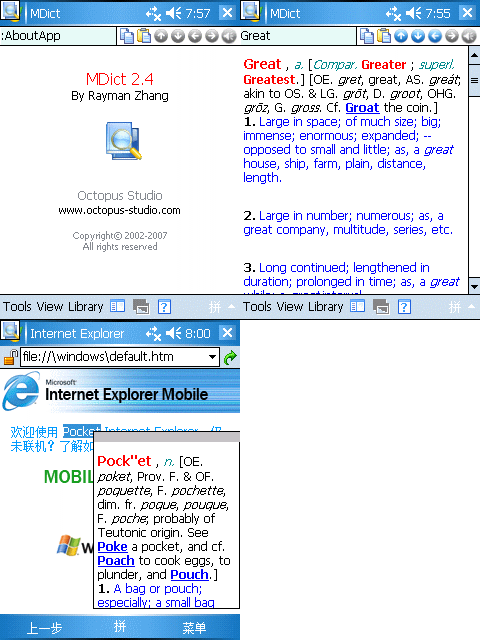 MDict is a multi-language dictionary under WinCE for PDAs, it dosen't provide dictionary data itself, but use libraries built by user.
Features:
Free for non-commercial personal use!
Multi-library support
Multi-language support
Online word pickup
Built in Simplfied/Traditional Chinese conversion
Supports PPC/HPC/Smartphone
Link
Download
 By default, the Smartphone 2002 platform links the phone user interface language and T9 predictive text input language. This linkage effectivel makes writing German text with an English language phone impossible.
This program allows you to make these assignments freely and according to your preferences.
Link
Download
 T- Day Counter is a Today screen applet that will show you the time remaining until a configurable date and time. It will count down the days up to your chosen setting. As soon as you're within the 24 hour range, T- Day Counter will change to hour mode. Once the deadline has passed, T- Day Counter will start counting the elapsed time.
Link
Download

 Call Assistant is assisting your while you are busy. It is running on your device and if you activate it, it is waiting for incoming calls and is then automatically sending an SMS to the caller with a defined text like "I am in a meeting, please try later"
Features
- Send automatically a SMS to Caller
- Use one of up to 7 predefined texts
- Define a Preselection-range, so Call Assistant is only sending SMS to Mobile Networks
- Allow only one SMS per unique Caller or for every call the caller makes
- Get a report of the SMS sent by the application and immediatly call back from there with one click
- German and English language support
- Supports all Smartphone 2003-Devices incl. the new devices with 240x320-Screens!
Link
Download SP
Download PPC
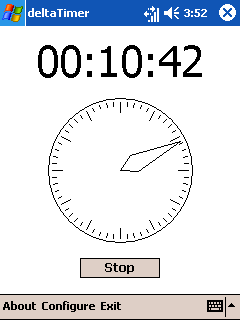 deltaTimer provides a simple, easy-to-use countdown timer: Set it to any time between one second and twenty-four hours and start it - the timer will count down to zero, all the time making sure the Pocket PC stays switched on (otherwise the counter would stop). Once the counter reaches 00:00:00 it will play a sound.
 To set the time, click on the timer, drag the minute hand or use your Pocket PC's directional pad.
deltaTimer is distributed under the GPL, so you might also consider it freeware. I'd love to get some feedback, so I can further improve my program!
To install, download the binary below and run the included .cab file on your Pocket PC. Note that you need the Microsoft .NET Compact Framework V1.0 (or any later version) to run deltaTimer.
LinkDownload
 deltaLock locks your Pocket PC's screen and buttons while it's in your pocket playing music or doing whatever would require it to stay switched on.
 To lock your screen simply launch deltaLock and your screen will turn off. To unlock your screen again, press and hold down two hardware buttons. The default IDs of these buttons are 195 and 198, which correspond to the "Windows" and "OK" buttons of a HTC Blue Angel but may vary with different hardware.
deltaLock is distributed under the GPL, so you might also consider it freeware. I'd love to get some feedback, so I can further improve my program!
To install, download the binary below, extract the zip file, then run the included cab on your Pocket PC. Note that you need the Microsoft .NET Compact Framework V1.0 (or any later version) to run deltaLock.
Link
Download
