ALarm Clock 2007 lite

Posted by BulsaPC under


More than your alarm clock !

0.2.5 version - faster, smaller and better !

Now for Smartphone and Pocket PC with various display resolutions and skins support...

Click here for more pictures...

Platform : SmartPhone 2003, 2003SE, Pocket PC 2002 and later.
For Pocket PC 2002 you need .NET Compact Framework 1.0.
Developed by : MS Visual Studio 2003 .NET with C#, required .NET CF 1
Tested on : Motorola mpx200 & mpx220, iPAQ 3850, MDA Vario, QTEK 8310, SPV C500, E-TEN X500, M700, G500 a M600, QTEK 8500


Author : W.I.N.C.O. (c) 2005 - 2007
Downloaded : 5014

.MSI file (required .NET Framework 2.0 for WXP)

.CAB file


author's website

TapTapSMS v0.3a

Posted by BulsaPC under
You can write your message relatively fast (when you are used to it - it takes some time) with ONLY ONE FINGER.

Update Description:

v0.3a:
- Skin.

v0.2:
- SEND button with selecting from WM5 Contacts (Phone book & SIM - this was really tough Mad).
- Bigger font in SMS text box and SMS counter.

Download

PocketCM Keyboard v0.9b

Posted by BulsaPC under
It offers a visible feedback of the key currently pressed, you can imagine that your finger is on the keyboard... and now you can easily see what key is pressed. You can move your finger, the key will change, release it, the key will be triggered (so it's the opposite of a physical keyboard: the actual action is when you release the key, not when you push it). For VGA Support, please download a VGA skin, for instance here. Unzip the file of this zip archive in the PocketCM Keyboard directory (\program files\pcmkeyboard\ for most of us).

Why another keyboard for Windows Mobile? Because:
- It can be used with fingers.
- It suggest word based on letter position.
- It trigger the key when your remove your finger from the screen, not when you press it.
- It can be customized.
- It's a standard Windows Mobile SIP, so to use it you have to select it as the input method, therefore it can be used in (almost) any application. Other reasons includes:

  • Customizable layout: as you can see the layout is "azerty" for the screenshot, by default PocketCM Keyboard comes with a QWERTY layout. Creating your own is just a question of editing a text file.
  • Accent recognition and suggestion: the keyboard know accentued letter... so for instance, the french word for summer is "été", if I type 'e', 't', 'e', the keyboard will suggest "été". No need to go to a sub/hidden keyboard doing some accentued letters.
  • Once you get used to it, you can grab it with two hand and type with the thumb... goes pretty well.
Download

HTC Task Manager 2.0

Posted by BulsaPC under
The all new new HTC Task Manager 2.0 helps you control your mobile device running processes. With it's new visual style this little application fits the new HTC black theme visual style. You have the ability to review all running processes, the memory usage and many other options.

Download
Take the power of Google Maps with you on your mobile phone.

Real-time traffic — See where the congestion is, and estimate delays in over 30 major US metropolitan areas.

Detailed directions — Whether you plan to walk or drive, your route is displayed on the map itself, together with step-by-step directions.

Integrated search results — Local business locations and contact information appear all in one place, integrated on your map.

Easily movable maps — Interactive maps let you zoom in or out, and move in all directions so you can orient yourself visually.

>Satellite imagery — Get a bird's eye view of your desired location. (It's like you're there, we swear.)

Download

Palringo IM

Posted by BulsaPC under ,
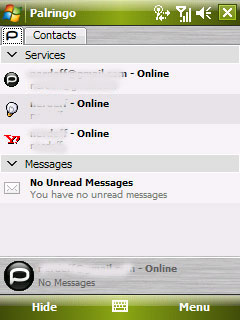
Palringo is a free IM (Instant Messaging) application.

Support Yahoo messanger, ICQ, MSN messanger, Gtalk etc.

A great, inexpensive way to connect and communicate

Transforms your mobile into a walkie-talkie: communicate with a contact or a group at the touch of a button

Like Instant Messaging, but with the option to use voice as well as text and photos

note that you need a free account with Palringo, to create it go to this web page


Download

TeKnowMagic's Checkers

Posted by BulsaPC under
This checkers game it is quite handy and will give you lot of fun. It offers 3 difficulty levels; you can select the desired level from the menu. This game also plays sounds for moves and actions and it is possible to enable/disable those sounds using menu options. The game also makes possible to change pawn colors for each player. By default, the game is ready to be played by a human against a Level 1 Computer Player, you can change that from the game menu and even select 2 humans play mode if you want to use the PocketPC as a board for playing checkers with a friend. How to play? Easy, you have to ways:
  1. You can tap on each piece, and then tap on the next cell where you want to move the piece (including complex moves) and then click the Move! Button, if you want to reset the path, click the Clear button.
  2. Just drag and drop the piece where you want, notice that if you want to do a complex move, you have to drag and drop slowly the piece over each one of the intermediate cells.
Download